Al Reickard - Principal
Jesús Santillan- Assistant Principal
jsantillan@rockfordschools.org
Jennifer Domagalski-Athletic Director/Student Activities
jdomagalski@rockfordschools.org
Address: 397 E Division Rockford, MI 49341
Website: www.rockfordschools.org
Phone: (616) 863-6300
A Note from Mr. Reickard
Dear NRMS Families,
The month of May is always one of the most exciting times of the school year. As we head into the final weeks, our school is filled with energy, celebrations, special events, and opportunities for students to finish the year on a high note.
I want to thank our students, staff, and families for their hard work and support throughout our spring testing season. We have nearly completed our state assessments, including PSAT 8, M-STEP, and MI-ACCESS, and our students have done a great job showing perseverance and focus.
Now, we turn our attention to our final NWEA benchmark assessments. These assessments are another important opportunity for students to demonstrate the growth they have made throughout the year. We encourage all students to continue giving their very best effort and to stay focused on finishing strong academically.
At NRMS, we often talk about the importance of stacking wins each and every day. Success is built through small, positive choices. Coming to school ready to learn, staying engaged in class, completing assignments, and treating others with respect. Those daily wins add up to meaningful growth and accomplishment.
The finish line is in sight, but there is still important work to be done. Let’s continue working together to help our students stay motivated, make positive choices, and close out the school year in strong fashion.
Thank you for your continued partnership and support of NRMS.
Mr. Reickard
Principal, NRMS
REMINDER
STUDENT DROP-OFF/PICK-UP PROCESS
If you choose to drop your child off and/or pick your child up from NRMS, you are required to use the Lincoln Street Entrance. This is the entrance used to access the student drop-off zone and athletic parking lot.
DROP-OFF TIME (ATHLETIC PARKING LOT)
7:10 am to 7:35 am
- Doors will open at 7:10 am
- Breakfast is available starting at 7:10 am
- Student hallways open at 7:25 am
- School starts at 7:40 am
PICK-UP TIME (ATHLETIC PARKING LOT)
- School dismisses at 2:30 pm
- Students should be picked up prior to 3:00 pm unless they are in athletics, attending a club, or with a teacher.
Lost and found
Please Label Student Items
We’ve noticed an increase in unlabeled water bottles and lunch boxes being left behind. To help us return items quickly, please make sure your student’s water bottle and lunch box are clearly labeled with their name.
Unclaimed items are placed in the vestibule, so please encourage your student to check there if something is missing.
Thank you for helping us keep things organized!
Summer Opportunities
Check out the Summer Opportunities offered through Kent ISD!
Important dates
May 22-May 25: No School, Memorial Day weekend
May 27- 8th Grade Michigan Adventure Trip
May 29th- 6th Grade 5K
June 4th-Half Day Dismissal at 10:30 am
June 5th- Half Day Dismissal at 10:30 am/Last Day of School
August 18th- 7th/8th Grade Orientation 8:00am-11:00am
August 18th- 6th Grade Orientation 12:00pm-3:00pm
August 21st- 6th-8th Grade Make Up Orientation 8:00am-12:00pm
MS Athletics
Click the button below to access all of our Middle School Athletics information! It will take you right to their website:
If you would like to contact North Rockford Middle School's Athletic office please email Kara Dault at:
After-school sporting events
Please note that students are not permitted to remain at school after dismissal to wait for a sporting event to begin. Students must leave school grounds at the end of the school day and may return later with a parent/guardian to attend the event.
Medication Drop-Off
If you have medication that you would like to drop off, our healthcare assistant will be here to assist you. Please bring all medications in their original container. Paperwork will need to be signed in order for our staff to distribute medication. RPS Medication Authorization Sheet
ID Cards
Student ID cards are issued to all students and should be carried at all times during the school day and at school-sponsored events. The ID card is not only for identification purposes but is also used to check out library materials, for the school lunch program, and more!
Lockers and Backpacks
All students are assigned a private locker and expected to use it to hold all their personal belongings, including their backpacks and electronic devices. The elimination of backpacks creates more space in classrooms and will grow our students in organization and planning!
Cellphone/Watch Communications/AirPods/Ear Buds
Instructional time is for learning. With 1:1 computer access at school, cell phones no longer have a place in the classroom. Our students are only permitted to use their cell phones before and after school. During the school day, all cell phones and earbuds/AirPods are expected to be kept in their locker. Students are required to use wired headphones during the school day to connect to their laptops if sound is required. The purpose of this practice is to eliminate distractions in our classrooms and to help our students stay focused on their academics.
Please note: If a child has an IEP or special circumstance, accommodations may be made through the Counseling Office or IEP team.
Unless explicitly directed by a staff member, students are not permitted to use a phone (or similar device) during the instructional period. This policy extends to our hallways and common areas.
Parents/guardians who need to reach a student during an instructional period may call our main office at 616.863.6300 and we will ensure that the student receives the message. Thank you!
School Lunch Accounts and e-Funds
1. Can I view my child’s account?
- You have access to view your child’s Food Service account via Family Portal. This is available 24/7 throughout the school year. Through this portal you have access to view your child’s daily purchases, deposits, apply parental restrictions as well as send a payment without a fee.
2. How can I make a payment on my child’s account?
- Using Family Portal or E-Funds allows you to make a payment of your discretion without any processing fees.
- Payment may also be brought directly to our office, located in the High School, 4100 Kroes Street. Additionally, you can send money with your child to their respective school or through the mail. All checks should be made payable to Rockford Food Service. When sending payment through the mail, please mail to the attention of Kristin Novak at Rockford High School, 4100 Kroes Street NE, Rockford, MI 49341.
We encourage all families who may qualify for Free/Reduced Meals to complete the application online to receive any additional benefits that may be associated with their account, which may include benefits both in and out of school. This information is also helpful for our school funding.
For additional information, please use the RPS Food Service Website.
Transportation Information
- If you missed the deadline, have questions about registering a new student, or have transportation questions, please call the transportation office at 616-863-6328 or e-mail mpuett@rockfordschools.org.
- Only the transportation office staff will be able to fill out the bussing form after August 8th.
Dear Rockford Community:
We are pleased to introduce you to My Ride K-12, a mobile app where you can access your student’s secure data at the touch of a button. Access to real-time data helps your student to be at the right place at the right time.
My Ride K-12 capabilities include the following:
- Stop location, assigned route, and scheduled pick up time
- GPS geolocation push notifications, giving estimated time of bus arrival and information concerning bus status changes
- Real time communication and messaging
- Secure and confidential log in
- Android/iOS app and web version available
The app is available for up to four users per student. If you would like to opt out of this platform, please contact transportation to have My Ride K-12 disabled for your student.
To access My Ride K-12 for your student, you will need to complete the set up by following the directions included in the Parent User Guide. Users will need their student’s ID number and Last name to link to their student. Please follow the Parent User Guide for instructions on how to access and use the app and web version. Please allow your phone to send notifications from this app and remain logged in to receive district notifications.
We trust this will be a helpful tool for you! Should you have any questions or concerns or would like to limit or remove access for your student on My Ride K-12, please contact the transportation department at 616-863-6328.
Rockford Public Schools
Transportation Department
attendance at nrms
Policy for picking up your student DURING the school day:
Please have your student come to the main office to pick up their pass when they arrive at school in the morning. A note stating the time they need to leave is helpful in case they forget the time they are leaving. This policy is to discourage calling into classrooms and interrupting teacher instruction. When you arrive to pick up your student please wait in the vestibule for them and sign them out on our sign out sheet.
If your student is sick or unable to attend school for the whole day please leave a message on our attendance line 616-863-6300 stating the reason for the absence. Please spell your student's first and last name.
"Strive for less than 5"
SRO Scoop
This is just a reminder that students being dropped off in the mornings before 7:40 must be dropped off using the Lincoln St entrance and the parent drop-off line, NOT the E Division St entrance. Thank you for your cooperation.
Please be mindful of buses dropping off and picking up students in the mornings and afternoons. If they are stopped with their red lights and stop sign out, traffic must stop in all directions unless there is an unpaved/physical barrier. Violations in this matter can result in a civil infraction citation of not less than $100.00 and not more than $500.00. The below graphic can be a helpful tool.

As always, if you have questions/concerns please don’t hesitate to reach out by email or contacting our department!
Counseling Corner
Mrs. Koops-Fikse and Mrs. Hughes are here to support your child! If your child is in need of academic, social, or emotional support, please have them come to our office. We are also available by contacting (616) 863-6313.
NRMS Counselors
Last Names A - L: Karla Koops-Fikse
Last Names M-Z: Angie Ohlman
NRMS Counseling Dog
Smudge
Library Loop
CHROMEBOOK CARE:
We want to take a moment to remind you about Chromebook care. When we first issued devices to students years ago, we spent a lot of time reminding students of the ways to keep their Chromebooks in good shape. Over time, we’ve gotten away from those reminders, but now that students are required to pay for damaged or lost devices, we want to remind you again:
- We recommend that students keep their device in a case when it’s not in their backpack. This provides extra protection in case of a drop.
- Please have your child always carry your device with two hands.
- Please remind your child not to walk around the classroom or your home with your device open. Close the screen so you can carry it properly with two hands.
- Do not pop off keyboard keys as they will eventually not pop back on.
- Chromebooks need to be charged to 100% most nights to function properly.
- Ask them to help remind their student(s) to power off and charge the Chromebook each night.
Do not touch another student’s device for any reason. You will be responsible for damage that results from an action you take, whether you meant to do the damage or not, so please be careful.
- Broken Screen $30
- Broken Keyboard (missing keys, etc.) $30
- Damaged chassis/lost device $200
- Charger $15
If you have any questions, please let us know. We appreciate your support!
Library FYI for families: If you receive a Thursday notification about a lost or overdue book and have any questions, please encourage your student to come to the library and ask library staff OR login to their Destiny account in HelloID and see which books on their account need to be returned. If your family needs to pay for a book that was damaged or cannot be returned, your student should bring cash or a check (written to Rockford Public Schools) to the library. Library staff will update the student's account and print a receipt.
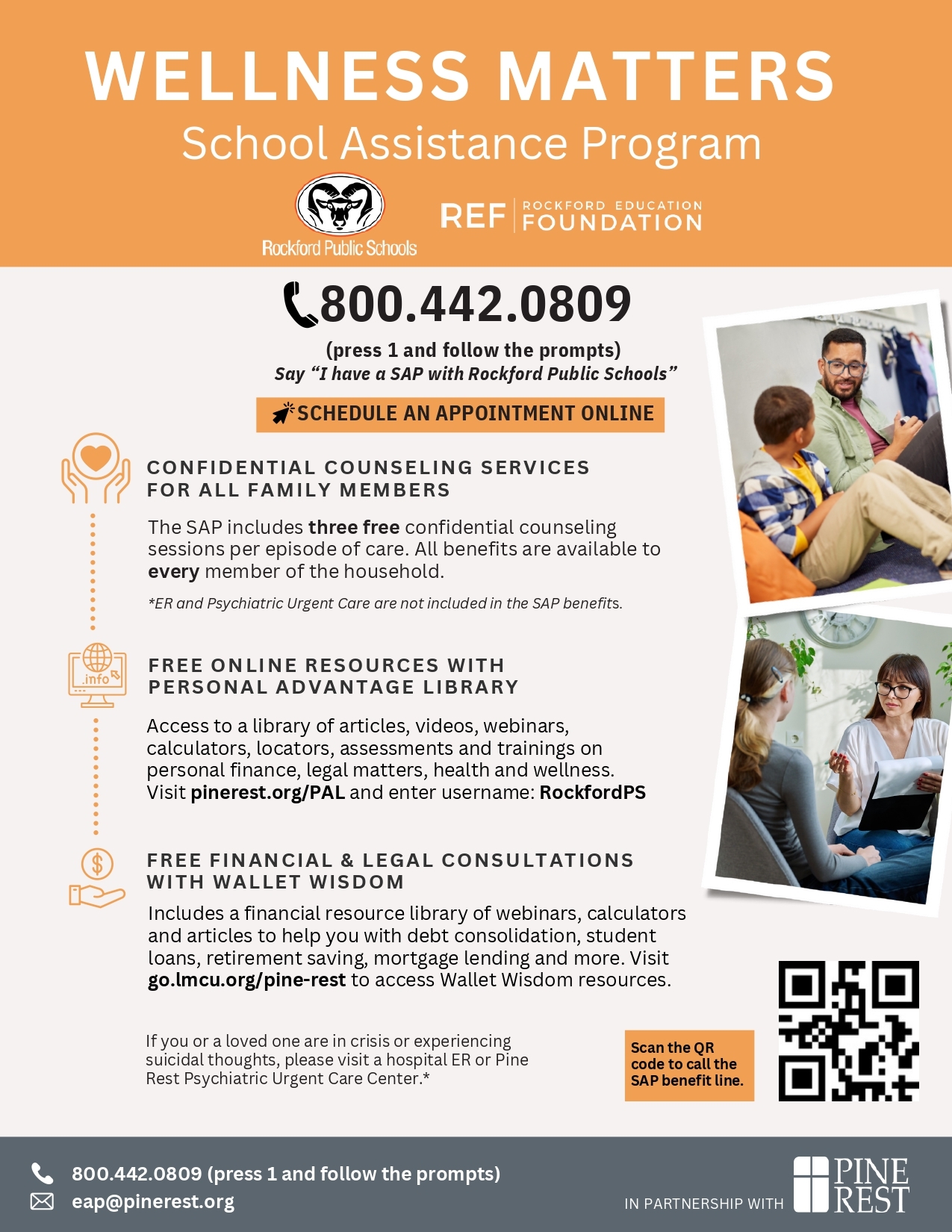
School assistance program (SAP)
Helpful Links